
Notice
Recent Posts
Recent Comments
Link
| 일 | 월 | 화 | 수 | 목 | 금 | 토 |
|---|---|---|---|---|---|---|
| 1 | 2 | 3 | 4 | 5 | 6 | 7 |
| 8 | 9 | 10 | 11 | 12 | 13 | 14 |
| 15 | 16 | 17 | 18 | 19 | 20 | 21 |
| 22 | 23 | 24 | 25 | 26 | 27 | 28 |
Tags
- 선형회귀
- AI #Inductive_Bias #Relational_inductive_bias
- mnist
- 파이썬
- 깃허브
- pandas #ewma #python #지수이동가중평균 #파이썬 #판다스 #ema #ewm
- 비동기모듈
- REST_API
- 깃
- Asyncio
- version_error
- 특정값지우기
- tensorflow #tensorflow-gpu #python #ubuntu #텐서플로우
- 판다스 #Pandas #DataFrame #Statistics #통계 #파이썬 #Python #Resample
- SQL #PostgreSQL
- Python
- aiohttp
- python #pandas #data_preprocessing #data_process
- MachineLearning
- fashionmnist
- 시계열데이터
- git
- pandas #python #date #datetime
- Github
- tf.where
- TensorFlow
- ngrok
- SQL #python #MySQL #PostgreSQL
- AI #RNN #LSTM #LSTMP #인공지능 #언어학습 #순차학습
- pandas #python #excel #판다스 #파이썬 #엑셀저장 #xlsxwriter
Archives
- Today
- Total
린스토리
[Error] "TypeError: decoding str is not supported" 해결 본문
코드 실행을 하다가 str 변환 구문에서 에러가 났다.
왜 생긴 에러인지, 어떻게 해결하는지 알아보자.
에러가 나온 부분의 코드는 다음과 같았다.
user = self.train_user_df['user_id'][row]  # type: str
hardware_label.setText(str(train_setting_log[str(user)]['hardware']))
user의 type을 print했을 때, <class 'str'> 로 나온다.
두번째 줄의 코드에서 보면, dictionary의 키로 user를 넘기는데, 이미 str인 타입에 또 한 번 str로 감싼 것을 볼 수 있다.
<class 'str'>은 다음과 같이 정의된다.
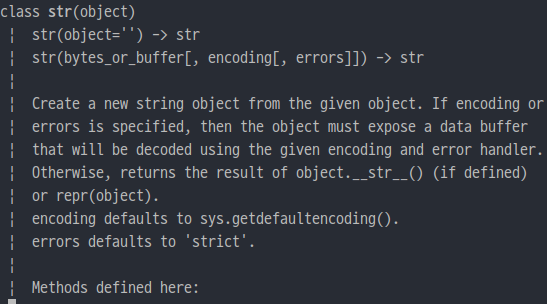

기본적으로 str로 형변환을 할 때, encoding default로 'utf-8'이 적용된다.
그런데 이미 타입이 str인 것에 str로 형변환을 시키면, 위와 같은 에러가 나오게 되는 것이다.
그래서 해결은, 그냥 str 변환을 빼면 된다.
user = self.train_user_df['user_id'][row]  # type: str
hardware_label.setText(train_setting_log[user]['hardware'])
이렇게 변수의 type을 미리 확인하고 적절하게 형변환을 적용해야 한다는 걸 알았다.
'Python > Python' 카테고리의 다른 글
| [Python-Dictionary] RuntimeError: dictionary changed size during iteration 에러 해결과 Pop & Del 차이 (0) | 2022.07.26 |
|---|
'Python/Python' Related Articles
more

Comments